Criterio
Evidence before the decision
Rostrum, the portal for every family
What the agents already wrote, for whoever will not open a folder. One portal for the PMO, the CFO, the CLO, the EA and the families to come: what needs attention today, the latest from each engine, what falls due and where each agent works.
Built · the map of every family, in testing · Apache 2.0

Why use it
What your agents already found, on a page the C-level does open
What needs attention, without opening a folder
What is overdue, what falls due in thirty days, open signals and unanswered questions from every family, on one page with a link. Nobody builds the committee report: the agents already wrote it.
Cases that cross functions, together
A budget signal on a project shows up on that project’s page, next to its plan and its risks. That view does not exist if each function has its own portal.
Disagreement, in writing
Whoever is looking leaves an agent a question, and the agent takes it on its next run. «This does not match what I know» becomes the document that was missing.
No new infrastructure
It runs on a laptop or on a machine in the network, behind the access control already in place. It needs no database, no service account and no internet access.
How each figure reaches the portal
The agents process
Each family processes its documents and leaves its record, its signals and its reports in its state.
Rostrum sorts
It reads the state of every agent on the map and gathers it: what falls due, what crosses families, what nobody answered.
People decide
The sponsor, the committee or the CFO look it up with a link, and ask in writing when something does not add up.
Tour
What each person sees
Six views of the portal on the test material of a financial entity. Pick one.
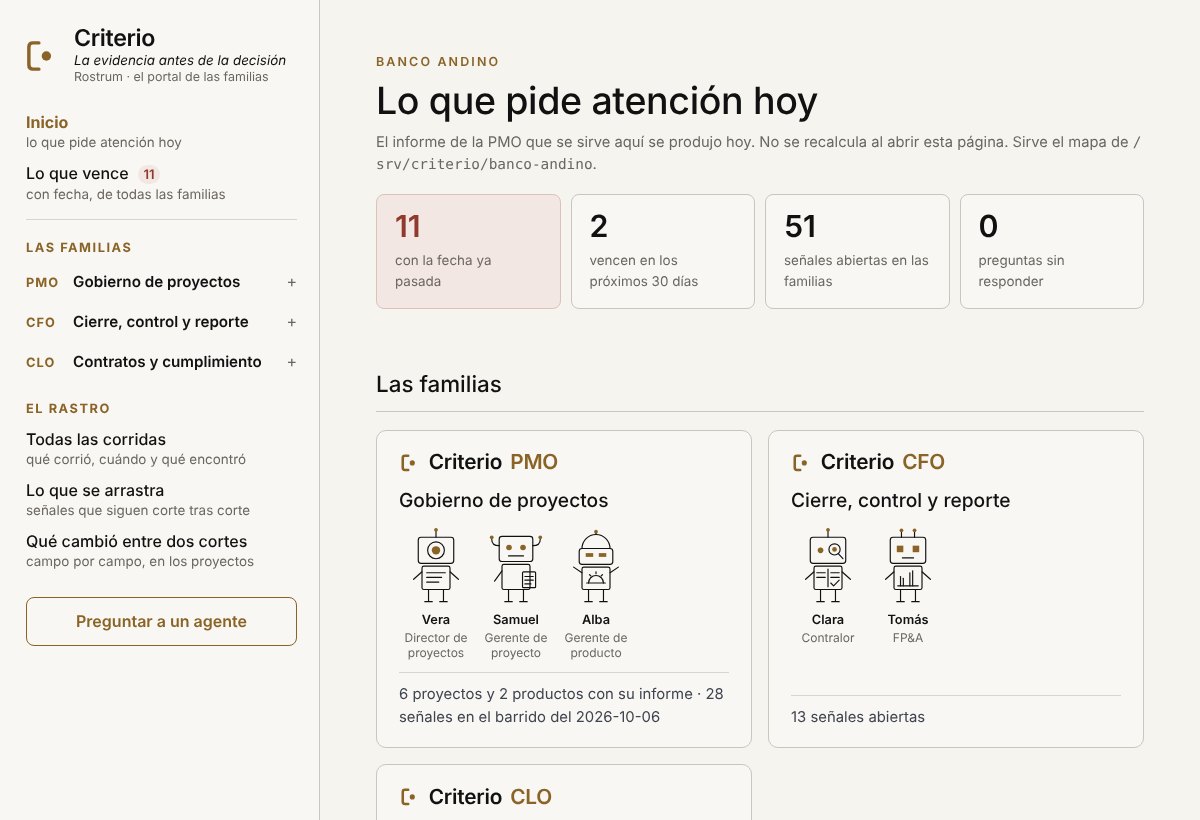
Home · what needs attention today
What is already past its date, what falls due in thirty days, open signals and unanswered questions. Then one card per family.
The trail
Every run, what is carried from cut-off to cut-off and what changed between two cut-offs. The history is never erased: that is how the PMO itself can be audited.
Ask an agent
The question goes to the chosen agent’s requests folder. An open request makes it speak on its next run, and it only stops showing once answered.
Screenshots of Rostrum on the test data of a financial entity, with the three families on the map. The portal is in Spanish. It is test material written by the repository; it belongs to no organisation.
Each family in Rostrum
No family is programmed into the server: it enters with its setup. Each one explains on its page how it enters and what it has in the portal. Ofelia’s office does not enter by default: only if its configuration says so.
Criterio CISO
Information security
Alexis · Guillermo · Amparo
Built · in testing
How it enters and what it has →What it never does
- It does not calculate
- It serves what the agents already wrote. Opening a page processes no document, which is why two people see exactly the same.
- It writes no record
- The only thing it creates is a request file. The write path into an agent’s state does not exist in the program, and its test checks it byte by byte.
- It does not serve what is not on the map
- Nor any state file that is not a report.
- It authenticates nobody, on purpose
- A server with no dependencies will not authenticate better than the access control your organisation already has. That is why it listens only on your machine unless told otherwise.
- It sends nothing
- No email, no notification. If something has to reach an inbox, a person forwards it.
How it was tested
131
checks in its own test, which runs on every change to the repository
97.8% or higher
of the checks on what it shows, across every round: 23,011 of 23,487. It is the floor of the 95% confidence margin.
WCAG 2.2 AA
on every linked page, at 1280, 768, 390 and 320 px, with Chromium and axe-core: no rule failed
The repository’s latest verification is from 2026-10-30, on commit d445dea0. What was tested and what was not, with the defects found and their fix, is in Rostrum’s evidence (Spanish).
Installation and configuration
How to install it
In this order: first the families, then the map, then the portal. Rostrum produces nothing; it holds up what the agents already wrote.
- 1
Add the Criterio marketplace, once.
/plugin marketplace add josenanez/criterio
- 2
Install the families you will use and run each agent’s setup.
Each setup searches for the root folder of its documents, offers it with the reason and, if you say yes, marks it with a visible file. It is the only thing an agent writes among your documents.
Family Agent Its setup Marks its root folder with Criterio PMO Vera · Project director /criterio-portfolio:portfolio-setup_CRITERIO_PORTAFOLIO.txtSamuel · Project manager /criterio-project:pm-setup_CRITERIO_PROYECTO.txtAlba · Product manager /criterio-product:product-setup_CRITERIO_PRODUCTO.txtCriterio CFO Clara · Controller /criterio-finance:finance-setup_CRITERIO_FINANZAS.txtTomás · FP&A /criterio-budget:budget-setup_CRITERIO_FINANZAS.txtÁurea · Treasury /criterio-treasury:treasury-setup_CRITERIO_FINANZAS.txtCriterio CLO Fidel · Contracts /criterio-legal:legal-setup_CRITERIO_LEGAL.txtConstanza · Compliance /criterio-compliance:compliance-setup_CRITERIO_LEGAL.txtCriterio EA Ofelia · Executive assistant /criterio-assistant:ea-setup_CRITERIO_DIRECCION.txtCriterio CCO Augusto · The forecast /criterio-sales:sales-setup_CRITERIO_COMERCIAL.txtValeria · From sale to invoice /criterio-revenue:revenue-setup_CRITERIO_COMERCIAL.txtCriterio CISO Alexis · Governance and controls /criterio-security:security-setup_CRITERIO_SEGURIDAD.txtGuillermo · Vulnerabilities /criterio-vulnerability:vuln-setup_CRITERIO_SEGURIDAD.txtAmparo · Response and recovery /criterio-resilience:resilience-setup_CRITERIO_SEGURIDAD.txt - 3
Install Rostrum.
/plugin install criterio-server@criterio
- 4
Build the map.
It finds each agent’s configuration in the working folder and shows it to you. You confirm what goes in.
/criterio-server:server-setup
- 5
Raise the portal.
It listens on http://127.0.0.1:8787, only on your machine, and stops with Ctrl-C.
/criterio-server:server-start
Without Claude, from the plugin’s folder, it is the same:
python3 scripts/mapa.py descubrir --raiz <working folder>
python3 scripts/mapa.py guardar   --raiz <working folder>
python3 scripts/servidor.py --mapa <working folder>/.criterio/rostrum/config.json
How it is configured: the map
Rostrum guesses nothing. Each agent leaves its configuration in the working folder, in .criterio/<area>/ or .criterio/<area>/<entity or case>/, and that configuration says where its documents and its state are.
server-setup finds them and shows them to you; you can leave out any you do not want to publish. The map is saved in .criterio/rostrum/config.json, with paths relative to the root folder: the map never publishes anyone’s folder. Rostrum completes them when serving, on the machine where it runs.
A family or an entity installed later shows up as new: you run server-setup again and it enters, without touching the server. What is not on the map is not served.
--puerto 8788- if 8787 is taken.
--abierto- to listen beyond your machine. The program warns about it on start.
Publishing it inside your organisation
To look at it for a while
Someone raises it, looks and switches it off. No infrastructure to ask anyone for. If you are not sure which you want, start here.
To keep it running
It lives on a machine in the organisation and the sponsor has a stable link. It is published behind the access control already in use.
What to ask for
- A machine inside the network and a port. It does not need to reach the internet.
- Publishing it behind the access control the organisation already uses.
- That the machine stays on.
What not to ask for
A database, a service account with permissions, a certificate of its own, internet access or touching any documents folder.